
What Is JSON? Beginner’s Guide to Formatting & Validating
Quick answer: JSON (JavaScript Object Notation) is a lightweight, text-based format for storing and exchanging data. It organises information as key-value pairs and lists that both people and computers can read. Websites, mobile apps and APIs use JSON to send data back and forth. To work with it easily, you format JSON to make it readable and validate it to make sure there are no syntax errors.
If you have ever opened an API response, a config file or a package.json file, you have already seen JSON. It looks a little technical at first, but the rules are short and easy to learn. In this guide you will learn what JSON is, how its syntax works, and how to format, minify and validate it using free tools.
What Is JSON?
JSON stands for JavaScript Object Notation. It is a plain-text data format that grew out of JavaScript’s object syntax in the early 2000s. Even though it has “JavaScript” in its name, JSON is language-independent. Python, PHP, Java, C#, Go, Ruby and almost every other modern language can read and write it.
JSON is standardised as ECMA-404 and RFC 8259. JSON files use the .json extension, and when JSON is sent over the web its media type is application/json.
Here is a simple JSON example:
{
  "name": "Asha",
  "age": 28,
  "active": true,
  "skills": ["SEO", "PHP"]
}
Even without any coding experience, you can probably tell what this data means. That readability is a big reason JSON became so popular.
Why Is JSON So Popular?
- Easy to read: The structure is clear, especially when formatted with indentation.
- Lightweight: JSON has less extra markup than XML, so files are usually smaller.
- Universal: Nearly every programming language has built-in JSON support.
- Perfect for APIs: Most REST APIs send and receive data in JSON.
- Maps to real code: JSON objects and arrays map directly to objects, dictionaries and lists in code.
Where Is JSON Used?
- APIs: Weather apps, payment gateways and social media platforms return data as JSON.
- Config files: Tools like npm (
package.json), VS Code and many frameworks store settings in JSON. - Web apps: Your browser and a server exchange JSON every time a page loads new data without refreshing.
- Databases: MongoDB stores JSON-like documents, and MySQL and PostgreSQL support JSON columns.
- SEO: Structured data such as FAQ and Article schema is written in JSON-LD, a JSON-based format.
- Authentication: JWT tokens carry their data as Base64-encoded JSON. You can inspect one with our JWT Decoder.
JSON Syntax Rules (The Basics)
JSON has only a handful of rules. Learn these and you can read almost any JSON file.
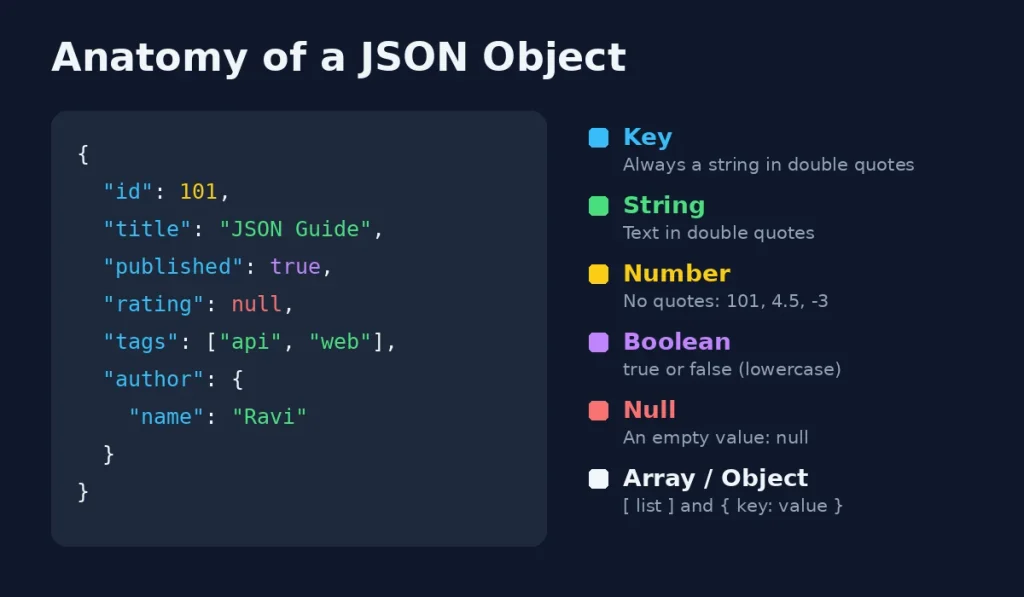
- Data is written as key-value pairs, separated by a colon:
"name": "Asha" - Keys must be strings wrapped in double quotes.
- Pairs are separated by commas, with no comma after the last item.
- Curly braces
{ }hold objects. - Square brackets
[ ]hold arrays (ordered lists). - Strings must use double quotes. Single quotes are not allowed.
- JSON does not support comments.
The 6 JSON Data Types
| Data Type | Example | Notes |
|---|---|---|
| String | "Hello" | Always in double quotes |
| Number | 42, 4.5, -3 | No quotes, no leading zeros |
| Boolean | true, false | Lowercase only |
| Null | null | Means “no value”, lowercase only |
| Array | ["api", "web"] | An ordered list of any values |
| Object | {"name": "Ravi"} | A set of key-value pairs, can be nested |
Dates, functions and undefined are not JSON data types. Dates are usually stored as strings, for example "2026-11-21".
A Nested JSON Example
Objects and arrays can sit inside each other, which lets JSON describe complex data:
{
  "id": 101,
  "title": "JSON Guide",
  "published": true,
  "rating": null,
  "tags": ["api", "web"],
  "author": {
    "name": "Ravi",
    "country": "India"
  }
}
JSON vs XML: What Is the Difference?
Before JSON, XML was the main format for exchanging data. Here is how they compare:
| Feature | JSON | XML |
|---|---|---|
| Readability | Short and clean | More verbose with opening and closing tags |
| File size | Usually smaller | Usually larger |
| Data types | Strings, numbers, booleans, null, arrays, objects | Everything is text unless a schema defines types |
| Arrays | Built in | No native array type |
| Comments | Not supported | Supported |
| Common use | APIs, web and mobile apps, configs | Documents, RSS feeds, sitemaps, older enterprise systems |
Got old XML data you need in JSON? Use our free XML to JSON Converter, or tidy it first with the XML Formatter.
What Is JSON Formatting?
JSON formatting (also called “beautifying” or “pretty printing”) adds indentation and line breaks so the data is easy to read. APIs often return JSON as one long line with no spaces. That is efficient for computers but very hard for people to scan.
Formatting does not change the data at all. It only changes how it looks.
Before formatting:
{"user":"Asha","plan":"pro","seats":5,"tools":["json","regex"]}After formatting:
{
  "user": "Asha",
  "plan": "pro",
  "seats": 5,
  "tools": [
    "json",
    "regex"
  ]
}
How to Format JSON Online (Free)
- Open the free JSON Formatter & Validator.
- Paste your JSON into the input box.
- Click format to beautify it with clean indentation.
- Copy the result or download it.
If your JSON has an error, the tool will flag it, so formatting and checking happen in one step.
Formatting vs Minifying JSON
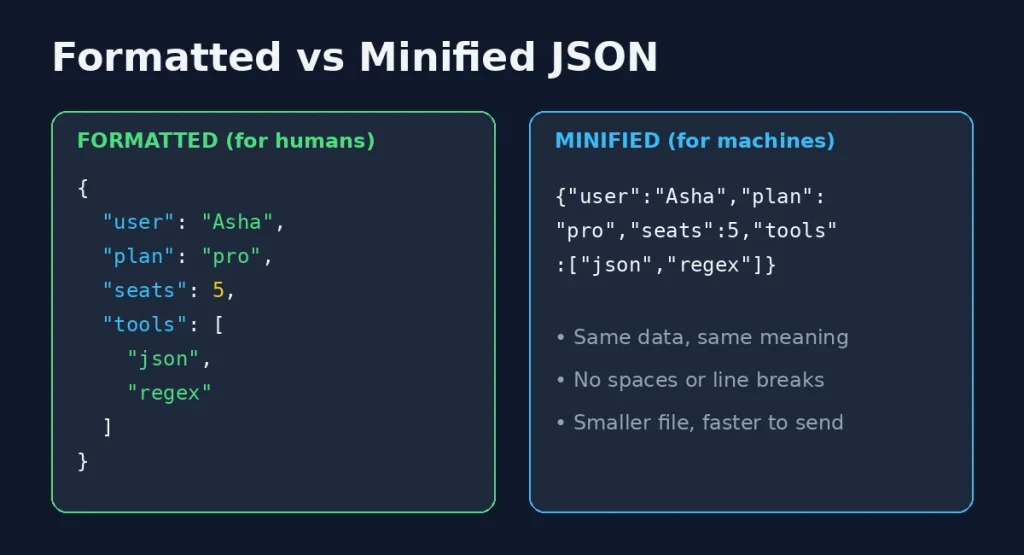
Minifying is the opposite of formatting. It removes all spaces, tabs and line breaks to make the file as small as possible. Smaller files load faster, which matters for APIs and websites that send a lot of data.
| Formatted JSON | Minified JSON | |
|---|---|---|
| Best for | Reading, debugging, editing | Sending, storing, production use |
| Whitespace | Indentation and line breaks | None |
| File size | Larger | Smaller |
| Data | Identical | Identical |
To shrink your JSON in one click, use the free JSON Minifier.
What Is JSON Validation?
JSON validation checks whether your JSON follows the syntax rules. Computers are strict: one missing quote or extra comma and the whole file fails to load. Your app may crash, your API request may be rejected, or you may see an error like Unexpected token or SyntaxError: JSON.parse.
A validator scans your JSON and tells you whether it is valid. If it is not, a good validator points to the line where the problem starts, so you can fix it quickly.
How to Validate JSON Online (Free)
- Open the free JSON Validator.
- Paste your JSON.
- Run the check.
- If there is an error, go to the line it mentions, fix it and validate again.
Tip: An error is often reported on the line after the real mistake. If line 8 is flagged, check the end of line 7 for a missing or extra comma.
5 Common JSON Errors (and How to Fix Them)
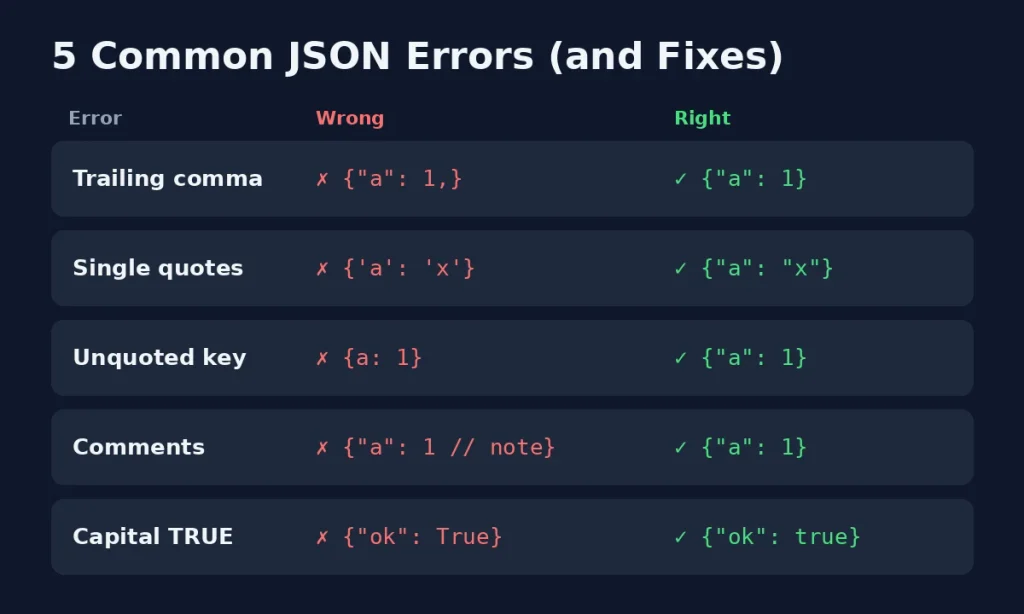
| Error | Wrong | Right |
|---|---|---|
| Trailing comma | {"a": 1,} | {"a": 1} |
| Single quotes | {'a': 'x'} | {"a": "x"} |
| Unquoted key | {a: 1} | {"a": 1} |
| Comments | {"a": 1 // note} | {"a": 1} |
| Capitalised boolean | {"ok": True} | {"ok": true} |
Other errors to watch for:
- Missing brackets: Every
{needs a}and every[needs a]. - Unescaped characters: Double quotes inside a string must be escaped as
\", and backslashes as\\. - Invalid numbers:
NaN,Infinityand leading zeros like007are not valid JSON. - Copy-paste quotes: Curly “smart quotes” from Word or Google Docs break JSON. Always use straight double quotes.
Best Practices for Working With JSON
- Validate before you ship: Check any hand-edited JSON before uploading it or using it in code.
- Format while editing, minify for production: Readable files while you work, small files for users.
- Use clear, consistent key names: Pick one style, such as
camelCaseorsnake_case, and stick to it. - Avoid duplicate keys: Different tools handle repeated keys differently, which can cause surprise bugs.
- Keep nesting shallow: Deeply nested JSON is hard to read and maintain.
- Do not paste secrets into random sites: Remove API keys and passwords before sharing JSON anywhere.
Related Free Developer Tools
- JSON Formatter & Validator: beautify and check JSON in one step
- JSON Validator: find syntax errors fast
- JSON Minifier: compress JSON for production
- XML to JSON Converter: convert XML data into JSON
- JWT Decoder: read the JSON inside a JWT token
- Base64 Encode / Decode: decode Base64 strings that often contain JSON
- URL Encode / Decode: safely pass JSON in URLs
Browse all free developer tools on BookmarkBuild.
Frequently Asked Questions
What does JSON stand for?
JSON stands for JavaScript Object Notation. It is a lightweight text format for storing and exchanging data, based on JavaScript’s object syntax.
Is JSON a programming language?
No. JSON is a data format, not a programming language. It cannot run logic, loops or functions. It only describes data.
Do I need to know JavaScript to use JSON?
No. JSON is language-independent. Python, PHP, Java, C# and most other languages can read and write it with built-in tools or libraries.
What is the difference between formatting and validating JSON?
Formatting adds indentation and line breaks to make JSON easier to read. Validating checks whether the JSON follows the syntax rules. Many tools, like a JSON formatter and validator, do both at once.
Can JSON have comments?
No. Standard JSON does not allow comments. Adding // or /* */ will make it invalid. Some tools accept variants like JSONC, but plain JSON parsers will reject them.
Why is my JSON invalid?
The most common causes are trailing commas, single quotes instead of double quotes, unquoted keys, comments, capitalised booleans like True, and missing brackets. Paste your JSON into a validator to find the exact line.
Is it safe to use an online JSON formatter?
For normal data, yes. As a general rule, remove passwords, API keys and personal data before pasting JSON into any online tool.
What is the file extension for JSON?
JSON files use the .json extension, and the official media type is application/json.
Conclusion
JSON is one of the most useful formats to understand, whether you are a developer, an SEO professional working with schema markup, or just curious about how apps share data. Remember the core rules: double quotes, key-value pairs, no trailing commas and no comments. Format your JSON to read it, minify it to send it, and always validate it before you use it. Try the free JSON Formatter & Validator to check your next file in seconds.